
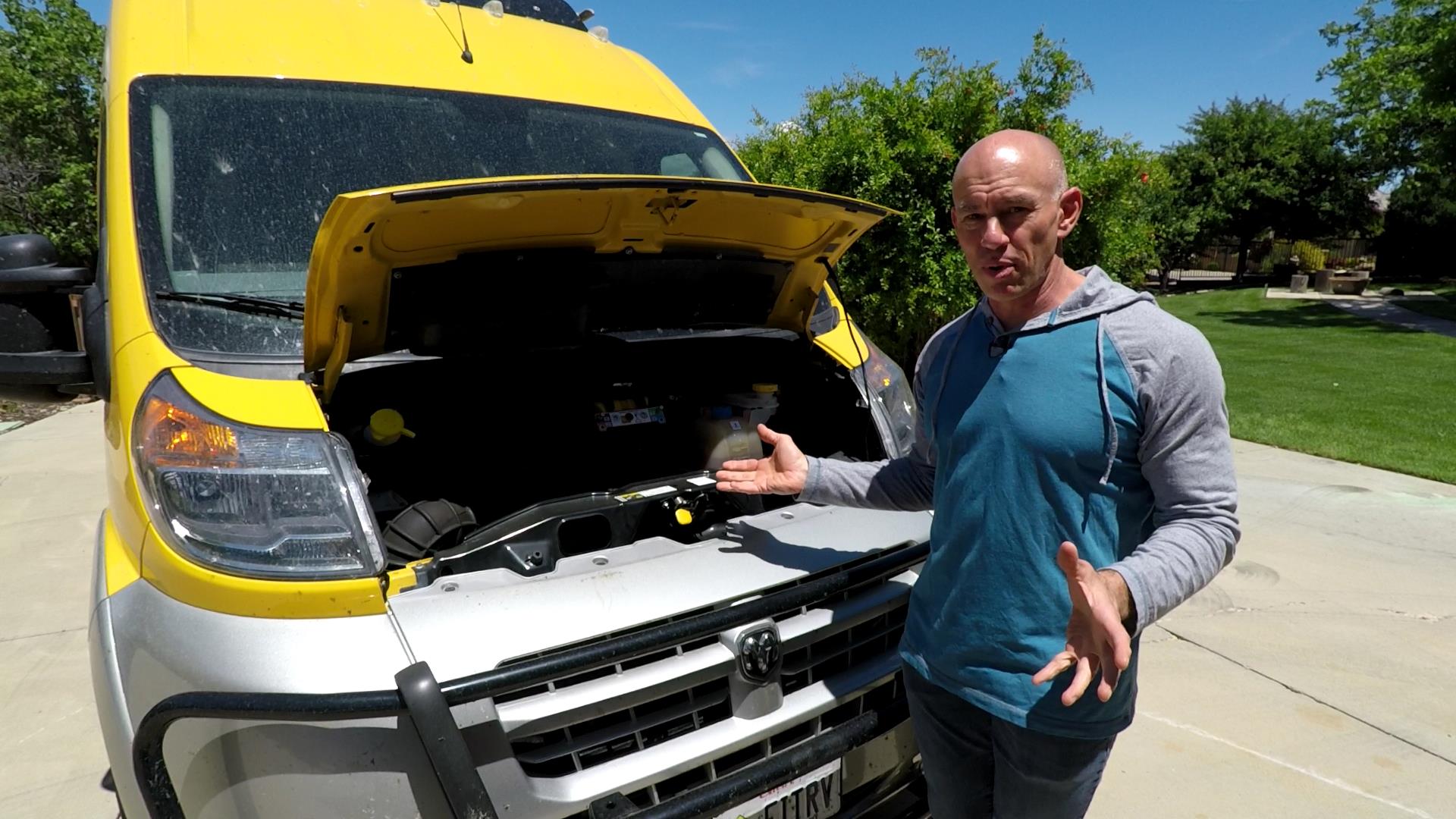
It’s no secret around here that we recently had a months-long bout of engine trouble with Lance. That’s been discussed to death elsewhere on the site (like HERE, and HERE), so I won’t rehash that. The one conclusion we received – from a technician who had disassembled Lance’s engine and tested individual parts – was that Lance’s thermostat had failed, and this led to a perpetual overheating situation that started the descent into ProMaster engine madness.
But here’s the thing: I had no way of knowing this. The ProMaster dashboard temperature gauge always shows the same thing… because it’s programmed that way. Don’t believe me? Watch this video! (And then see what I decided to do about it.)
I was determined not to let something like this happen again (duh). Given that it’s impossible to get any meaningful information from a gauge that always shows the same thing, I needed a new solution. So I turned to the OBD2 code readers that are available today. I explain this in the video, but these are devices that plug into the “check engine light” port on your vehicle, and then can display information from your vehicle’s computer – in real time – to you in the cab. There are lots you can pick from – but these are the four I took seriously:
The ScanGauge II
This was the first on my list because a Travato-driving buddy of ours uses one on his rig. In fact, you can see a picture of it in action in the comments on this post. This would be a very safe option, as it’s tried and true, and proven. I know several other ProMaster RV owners who have installed one and are happy with it. It DOES require an install – you have to run a cable and mount a display unit.
Edge Products Insight CTS2 Monitor
Yes, this thing is crazy expensive compared to the others. But it was recommended to me as “something that I can guarantee will work” by a friend who’s into race cars… Race Cars! Lance is a race car, right? Well not really. But this was useful to research as a top-tier unit, so I had something to compare other ones to.
The UltraGauge Blue
In looking around at OBD2 monitors on Amazon, you’ll no doubt stumble across a number of Bluetooth solutions. Many of them are from offshore companies with names like “Zoomitech” that I wouldn’t totally trust. In the end, this is the one I wound up going with because of the reasons you’ll hear me go over in the video. I chose UltraGauge over some of the other imported solutions because UltraGauge is a US company (though the units themselves are manufactured in China).
UltraGauge Wired Units
Once I started looking at UltraGauge, I flirted with the idea of using one of their wired units – namely because they seem to have a good quality unit for a lower price. You might want a wired unit if you don’t want to worry about the latency of a Bluetooth solution. Or, if your Bluetooth connections from your smartphone are notoriously flaky and you don’t want to deal with something that ultimately becomes annoying due to connection problems.
The other thing I needed to complete the solution was a way to mount my phone. I decided to use something that I haven’t used in any vehicle in over a decade… the CD Player! I picked up this CD player mount for a smartphone from Amazon, and then I had everything you see in the video.
Oh – And About that Check Engine Light
I honestly didn’t plan or plant that check engine light you see in the video! But it does highlight one of the other super-cool benefits of the UltraGauge blue (as compared to a hard-wired unit). The smartphone app makes it extremely easy to see what’s causing a “Check Engine” light. I‘m not even in the van now, but I can still pull up the code on my smartphone. This is what I get:
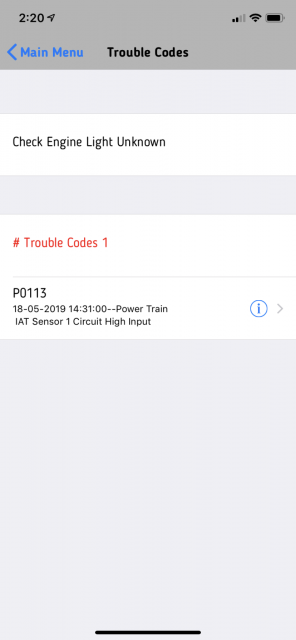
And if I tap on the error code, it searches it on the web for me, and I get this information:
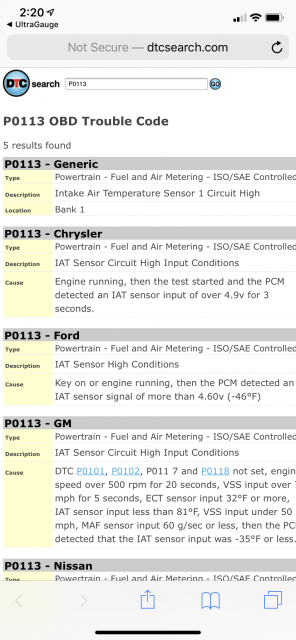
So now – later this afternoon – when I head to the RAM dealer to have it looked at, I know what to expect. (And if I were going to a dealership I didn’t trust, it would be a good way to check on them.) I should say that this information is usually available from any OBD2 code reader, but the smartphone app really takes the display of it to the next level, and I don’t have to be in the vehicle to recall it.
Well, that’s going to do it for now. I suspect this IAT thing is probably something that was fudged up during Lance’s recent heart transplant. But I guess we’ll see.
Gotta run!
SUPER UPDATE!
Over the past couple weeks, I’ve been working with the support folks at UltraGauge to try to get the Transmission Fluid Temperature available for the ProMaster. We’ve now got that problem solved. If you upload your vehicle’s info, you should be able to download the appropriate gauge from UltraGauge. Then all you have to do is “TEST” the gauge, and it will activate for your rig. Besides having new information on how our ProMaster is doing, I’m also very pleased at my interaction with UltraGauge support. They know their stuff, and they kept working it until we got the gauge working.







Has Dodge RAM had anything to say about this overheating issue? Also, what happens in other vehicles? Are they all the same? At what point should one pull over and let things cool off?
There’s been no official statement as far as I know, but they did replace our overheated engine under warranty.
I’m not an auto industry insider, but I think this kind of programming is probably common on newer vehicles – it keeps people from complaining about engine temperatures.
As far as when to pull over: if we ever hit 230, that’s when I’d take a break. But that’s just my own opinion and not official advice from Dodge.
Stellar info James! Yesterday on my way home through Colorado, I was stopped at a construction delay. I noticed steam coming from under the hood and heard a lot of hissing. I pulled over and saw that I had deposited a significant amount of coolant on the pavement. My temperature gauge on my 2019 Travato was sitting in the middle just like you demonstrated. I could have blown my engine had I not been stopped by the construction. Our tire system warning lights are always on no matter the actual pressure in the tires. We get a warning that our brake system has failed when we go down a steep decline off of a mountain pass (like Vail). The gauges on the Ram have not even a casual relationship with what is actually happing with the vehicle.
Sorry to hear about your overheating, but glad you caught it in time!
And yes – the ProMaster gauges are “Service Call Avoidance Gauges”. I’d get one of the OBD2 readers and be done with it.
UltraGauge Blue – I bought one last summer. Added the Coolant Temp gauge and the UG Blue did indeed keep tabs on the temperature for nearly a year. And then it died a few weeks ago. Bummer.
It is a dissapointment to spend the better part of a 100 dollar bill and have a device like this fail. I do hope there are no personal or family issues or Pandemic related that might be the cause of the company having gone silent during our troubleshooting via email. Email is the only way to contact this company.
Does my UG Blue have a 30 day or 1 year warranty? Right now I don’t know where I am at with this, purchased under my wifes name. The UG web site, home & warranty info pages contain conflicting information on this point unless I misinterpreted or missed some specific detail. UG has no telephone number to call. There is no address to write too. I suspect if they accepted a product return, you would get an address from UG at that point.
For the time being, I have returned to furtively glancing at my dash coolant gauge from time to time while driving. Funny thing when I mentioned the mid-level gauge reading issue to the Service Advisor at the dealer while I had the coolant fan factory recall completed. She replied that she had seen plenty of Promasters with the coolant gauge pegged . I thought that was an odd thing to say but I let it pass. Are there numbers of overheated and possibly too late to save an engine, able to suddenly force the gauge beyond its mid-scale point? Not that this does any good but it would be nice to see FIAT own up to this dash gauge issue and fix it.
I don’t know about the warranty on the Ultra Gauge. Ours has continued to work well, so I’ve never investigated.
I will say that I’ve only been able to contact them via email as well. Hope that gets sorted out for you!
As to the temperature gauge… A gauge that only warns you when your engine is about to blow up isn’t a gauge at all – it’s a warning light.
You’re absolutely right, and I wish Fiat would do something about the gauge. It would probably only take a software update…
Hi James,
I have the ultra-gauge and when installed have the option of 2 trans temps
*dodgeram 29-bit trans temp (F)
*dodgeram 29-bit trans temp 2 (F)
both display different numbers. do you have advice on these gauges?
I’m using temp. (Not temp 2.)
It’s giving me readings that seem reasonable.
Thank you
I have successfully added the Dodge Transmission Temperature gauge to the Ultra Gauge Blue app for my ProMaster. However it requires an extra non-standard step that does not appear to be documented on the Ultra Gauge website.
First install Ultra Gauge Blue per instructions and confirm that the app is working. This includes configuring Ultra Gauge by entering the VIN and downloading all the vehicle parameters. Once everything is working, go to the Vehicle Info screen by clicking the vehicle name on the top right of the gauge page. Change the Vehicle Make to be “Dodge” (currently it is set to RAM). Change the vehicle Model to start with “Ram” (you can leave “ProMaster”, but make sure it starts with “Ram”). Hit the cloud upload button to push the updated info to the cloud. At this point you can follow the standard directions to download, test, and apply the Dodge Transmission Temperature gauge.
Larry- Thanks for the instructions on how to get the Trans temp loaded into the App. I’ve been piddling around with adding and arranging gauges on the screen of my Iphone, have the Tranny temp displayed on the first screen. What is normal operating temp for the transmission? Any suggestions on where to set the temp alarm? Thanks Everyone!
James,
in the old days when thermostats failed, they would remain stuck in the closed position, causing vehicles to get stranded with overheating engines (I’m talking the 70’s here). A clever new design was created that remains stuck in the open position when failed, which is what you’ll notice if it takes a long time for your heater to put out warm air during cooler days. I would double check with the mechanic that told you a failed thermostat caused overheating, which is very unlikely unless there are other circumstances like incorrect installation.
Just my two cents.
Emile.
I had the same thoughts, but the shop that ultimately fixed the issues sent me a video of them testing the thermostat by dropping it into hot and cold water.
Hi James,
After reading your blog about the temperature gauge issues, I bought the ScanGauge II. I am in week five of a 2 month roadtrip and like you I work during the day and travel in the afternoon and weekends. As you probably know, ScanGauge can also give you the Transmission temperature. They supplied me with the necessary information to set it up. As well it has been documented in the Travato Facebook entries.
I have seen some very disturbing temperature readings and believe the transmission cooler is undersized. Going up Teton Pass, I hit 242. From what I have read about transmissions temps, this is a deadly number that will shorten the life of the transmission. After hitting that number, I did some research and decided to stop and cool the transmission if it ever got to 220. I have had to do this five or six times so far. This only occurs on really long accents. We have traveled to Yellowstone and all around the Sierras so there have been many places where this is an issue. If interested I can list the routes that cause the high temps.
As soon as I finish my roadtrip I am having my transmission fluid changed and a larger cooler installed.
As I see this as something the entire community should be aware of I was hoping you could take a look and see what you think. I have posted this info on Facebook but it did not get anybody concerned.
Thanks to you and Stefany for all you do for the Travato community.
Interesting. I know the scan gauge can get the transmission temperature, but I have thus far been unsuccessful in setting that up on the Ultra Gauge. I suppose that would be step one. It looks like a call to Ultra Gauge is in my future.
There are other questions that come to mind… things like, are you using Tow/Haul mode, and have you noticed that has any effect on temperature? What does your rig weigh when you are out on a trip. Things like that which could be affecting the results you’re seeing.
Thanks for the post!
Hi James,
I have never used the Tow/Haul mode. After reading what it is for, that may help. I have a 2018 G, with a bike rack and two 35 lb kayaks on the roof. So I am not sure of my weight but it should not be any different than most. Maybe the kayaks are creating an additional load. I will try the button the next time.
Thanks!
Another update here – after working with the folks from UltraGauge, I have the transmission fluid temperature showing on the UltraGauge Blue. I’ve only had it on one outing so far, but it was taking Lance up to Cedar Breaks National Monument at over 10,000 feet. On the whole journey, the TFT never got out of the 170s. Granted the weather was colder (like really cold) up towards the top, but 240s seems really high to me now.
I have check everywhere on the ultra gauge site and followed the upload instructions you provided and still didn’t receive the transmission temp gauge. That was one of the reasons I purchased this model
Have you tried logging a ticket with Ultra-Gauge support?
I couldn’t figure it out myself either, and it took some help from them to make it all work.
Hi.
I was wondering if the Wired UltraGuage Blue would Display the Transmission Oil Temperature on my Promaster 2500
I don’t know about the wired one, but with a custom gauge (don’t remember how I set it up), it did display transmission temp on our ProMaster.
Great article and timing. I had noticed on our last RV the gauges never changed. We just bought a new View and it doesn’t have gauges. We drove it home, about 250 miles, turned it off and the chassis battery was dead. I just now ordered the ScanGauge II.
Thanks
So — what is your list of gauges you enable on the tool? There are so many, not sure which are the most important. Of course, the temp one is key.
Load speed and coolant temp on the main screen.
A bunch of trp /fuel/mpg gauges.
Intake air temp (now that it’s fixed).
And instant MPG (which is different from what the dash says).
Others are still in flux.
Thanks — my mind has a problem wrapping around why a numerical stat would be different on the dash than on the gauge … Where is the dash finding it’s number … thin air?
The gauge on the dash has no numbers. And it never moves!!! It shows the same value always. Even though, as I showed in the video, the temperature moves around a lot.
The gauge is programmed to not respond to temperatures over a wide range, and just always show halfway. That’s neither useful nor accurate.
They might as well have just put a warning light on there.
I got my gauge installed today and it shows 162 gauges found, but I can only see 4. How do you get the other gauges to show up? I can’t even see the tire pressure information.
Disregard. I figured it out.
Well, I can add gauges but cannot figure out how to add the tire pressure information.
I don’t have tire pressure available on mine either. I don’t think it’s available.
We use a separate tire pressure monitor from TireMinder. This one.
I think I have read that some high-end replacement radios can display tire pressure in the ProMaster. That makes me think the info must be available although I cannot find any other device that can access it.
Did you consider the BlueDriver Bluetooth Pro OBDII Scan Tool for iPhone & Android.
Didn’t really look at that one. Does it work well?
My 2016 Sprinter Airstream temperature gauge really works. I can tell when it is running hot or very hot in comparison to the normal running temperature. If it is very hot due to a high work load or a highish load under warm temps or I am driving very slow over wash board then when I speed up and/or the load is reduced I can see the temperature dropping (slowly) back to normal.
Glad to hear it’s not an industry-wide epidemic!
Just ordered the UG-wired. Opted for the wired for a few reasons — mainly, though, because I’m planning to replace the radio with one that uses ApplePlay/Android Play to let us use the phone GPS (instant updates, etc.) … didn’t want to have to do switching as much. Figure routing the wiring shouldn’t be too bad. Can probably still use the phone to look up codes … right?
Yep – the code lookup uses an external site. No reason you couldn’t visit the same site with your phone!
Do you know if the way Promaster displays (or doesn’t) the temperature is the industry standard on other vehicles also? I rarely if ever see a temperature variation on the gauges of other vehicles I drive either. Maybe all our “modern” cars/trucks need an improved temperature gauge too.
Is there a factory listed temperature above which we should be concerned? You say 230, others say another temp. I would think Ram would have a number, no?
Thanks for the research and advice.
If I get around to it, I’ll try plugging the UltraGauge into some other vehicles, and see if they have “bogus” temperature gauges too.
As far as a number that RAM says, I can ask next time I go in for service.
But I suspect if RAM had a temperature number they were willing to share, they would have just given us a working gauge in the first place!
James – great video as usual. I started with a ScanGauge II on my Sprinter, but switched to a wired UltraGauge about four years ago. It is a great product that I use to monitor the Diesel Particulate Filter (DPF) regenerations on my 2012 Sprinter. I use a nine parameter display on my UG. Does the UG Blue give you instant access to all the engine parameters on your phone? That could be a real advantage.
I don’t know about *all* the engine parameters, but I can display any of the available gauges on my phone, yes.
A follow-up: It turns out the Ultra-Gauge products (there are several) only offer a set of industry standard measurements. If e.g. you want to monitor transmission temperature, which does not have an industry standard code, you won’t find it offered in the UG products as manufacturers also define proprietary codes, by vehicle & year, for many such measurements. UG does offer a ‘programmable’ UG code reader known as the UG ‘MX’ which can be programmed to read up to 8 of these proprietary codes. Disappointingly, they offer no detail info on these codes and the tech at your service center may have no idea what your specific make/model/year vehicle’s code is for a given proprietary code. UG directs customers to search vehicle forums for this info (which I previously have tried without success). Even more frustrating, UG has disabled their forum where this info was intended to be shared between users and potential customers.
Bottom Line: If you want one or more specific measurements that are not common industry standard codes, you’ll need those codes for your specific make/model/year vehicle before even programmable scanners like the UG MX can present the data for you.
Good summary!
The UltraGauge Blue also has the ability to enter custom codes. I haven’t taken the time yet to identify and program the parameters for transmission temp.
UltraGauge’s official statement on Manufacturer’s Gauges is here: http://www.ultra-gauge.com/customer_support/knowledgebase.php?article=41
Hi James, Does the UG-MX give you the transmission temp.? After searching some of these readers I see many say that if you leave the reader always “On” some of there gauges go haywire!? Also some say that it runs there battery down so far they have to jump it. If you drive every day it might not be a problem unless your battery is weak. Do any of these readers have a On/Off switch so you can leave it plugged in & can turn off the power? I have not seen any. On a Travato if you only drive it once or so a week, it might run the battery down..
Your thoughts?
It does not give transmission temp on the ProMaster out of the box. There is a programmable mode where you can enter specific parameters that might get you more information that’s not standard. Another commenter has done a good job describing this mode.
Regarding battery draw: UltraGauge addresses that specifically here: http://www.ultra-gauge.com/customer_support/knowledgebase.php?article=7
Thanks for identifying this. I would like to be proactive on this issue. Can you please identify the thermostat that needed replacing with part number? I realize that it may be a different part number based on model year but it will give us a starting reference.
Sorry! I don’t have the part number for the RAM Thermostat.
Ours was replaced with the entire engine.
So, the driving issue here is the “dummy” temp gauge that is common to all modern vehicles. And the “need” to watch/know the engine temp. And that implies knowing at all times what the temp is running? And the gauge and alarms are only available/working when the app is running and connected to the BT device? Are you planning on having the app running all the time??? And you have to have your smart phone in the vehicle and connected? Thinking maybe a dedicated display on all the time is needed?
As long as the phone is in the vehicle and powered on, I’m covered. (And I can’t imagine leaving on a trip without a phone.)
The app does not have to be running, nor does the phone display have to be on. The phone does have to be powered up, but since we have two USB ports on the dash, that’s not really an issue.
The adapter connects with my phone when the vehicle starts. It even makes an “engine starting” noise when it starts up (which will confuse you the first time if you’re not expecting it).
From that point on, the alarms are active and I’m covered.
Although certainly the units with the dedicated display are a viable option. They’re just harder to move from vehicle to vehicle.
Just ordered my Ultragauge Blue with windshield mount directly from Ultragauge. The only thing Amazon carried was wired to a display and I just didn’t want to deal with yet more danglies than I already have to. The last one(s) I installed were the Battery Tender plug in to the battery. Since in the ProMaster that’s under the floor mats between the two front seats, I got tired of pulling up the Weathertech floor mat just to get to it. The one after that is for the dashboard install of the MidlandUSA GMRS micromobile unit and its magnetic mount 6 DB antenna. Enough danglies with the USB input for music and the audio in for the Pono Player. Of course the cooling fan and the 5 channel amp and subwoofer. Yes, there’s still room for me but I think the tech is starting to take over!
Yeah, I don’t know why Amazon only has the wired unit. Oh well.
Several things. I have a new ProMaster and put in the ScanGauge I already have. It runs 190-212 most of the time..My Civic posts similar numbers, topping out when climbing steep hills at low speed. It seems like the car runs the cooling fans very sparingly, since it stays cooler taking hills at higher speeds.
One concern is that the ProMaster’s manual says not to run any monitoring device on the OBD port:
“• ONLY an authorized service technician should connect
equipment to the OBD II connection port in
order to read the VIN, diagnose, or service your
vehicle.
• If unauthorized equipment is connected to the OBD
II connection port, such as a driver-behavior tracking
device, it may:
• Be possible that vehicle systems, including safety
related systems, could be impaired or a loss of
vehicle control could occur that may result in an
accident involving serious injury or death.”
I think that’s bull.
So how hot is too hot? 220 maybe? Did you ask the technician?
TFL Truck was doing a towing test on the Ike Gauntlet and they had a monitor in the tow vehicle and it was running 230 degrees. They never even mentioned it.
Yeah, I think that’s a play to try to scare people into going into their dealer. Or maybe it’s a ploy for them to deny warranty repairs to electronics?
If you read that strictly enough, you couldn’t even take your ProMaster to a local auto repair shop that wasn’t “authorized”.
(Man, I’m getting cynical…)
I’ve got my alarm set at 230. Lance normally runs at about 212 on the highway. He only gets over 220 when climbing.
I’ll ask the tech what a good range is when I pick him up from the IAT thing.
I agree James. Pure profit motive and CYA at work on RAM’s part there with that statement. I suppose it is possible a poorly made reader could cause a problem. That’s why I also chose an UltraGauge Blue though. First they give you a gauge that is worse than an idiot light since it does nothing. Then they tell you not to do anything to get a better idea of what is really going on. Disappointing. I’ve got about 6K miles of use on my UltraGauge now with no ill effects.
Thanks for the update, Roger! Good to know there are indeed no ill effects from the UltraGauge.
I like the OBD scanners but I never use the one I bought because I’d have to run the output app on the phone to see the gauges and I’m usually using the phone for maps or music, etc. So one of the dedicated display units seems like a good thing to try, thank you.
James…PERFECT timing! First off, congrats on being prepared for the *next* engine issue, even if this one was disguised from you. I’ve just been researching OBD2 readers or scanners because I’d like to monitor my transmission temperature. Our ‘venerable’ Tahoe is our tow vehicle but only has a 4-speed transmission. With the engine screaming in 2nd gear recently while towing our trailer (we live in the Rockies) my bride – as is so often the case – asks just the right question: “How do you know the transmission isn’t overheating?” Thus, the scanner research.
I’d seen UltraGauge Blue on the Web and I’ll be digging into some product details from them. One suggestion for others who watch this: My first stop was the Chevy dealer, where I asked if my old Tahoe’s OBD2 port provides transmission temperature. ‘It does on our GM readers’ was the answer. So that’s one of the benefits of working with a U.S. company who offers product support. I now know the data is ‘there’. It’s just a matter whether this scanner looks for it, which I’ll ask the UltraGauge folks.
Condolences on the engine repair bill, James. No one has promised us that fun is always free…
I’d worry if coolant temp got higher than 220°F. I’d be much happier if temp was 195-200°F.